Features / Plan & optimize

03 AI Production Planning Agent

Hand the messy planning week to an agent your scheduler validates.

The AI Production Planning Agent turns selected orders and backlog into optimized schedule scenarios, asks for the manager decisions that matter, lets planners edit or revise assignments, and commits the accepted plan through acqSYS scheduler validation. It is a core part of the platform on every Professional and Enterprise line.

Use the demo to plan selected demand, compare scenarios, adjust assignments, and commit jobs without losing scheduling safeguards.
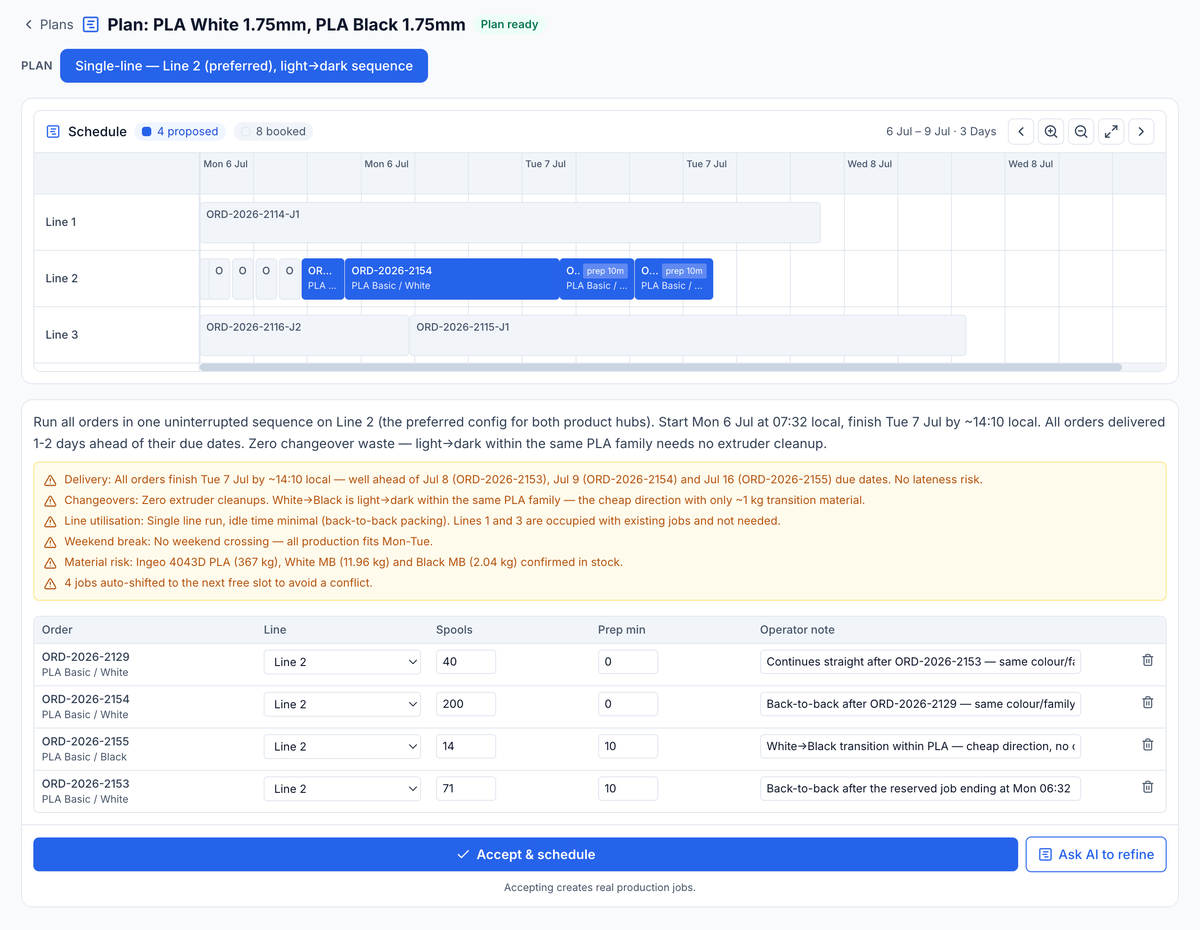
AI Production Planning Agent, plan ready: single-line Line 2 light-to-dark sequence, four proposed jobs on the schedule, the reasoning behind the plan, and Accept & schedule.
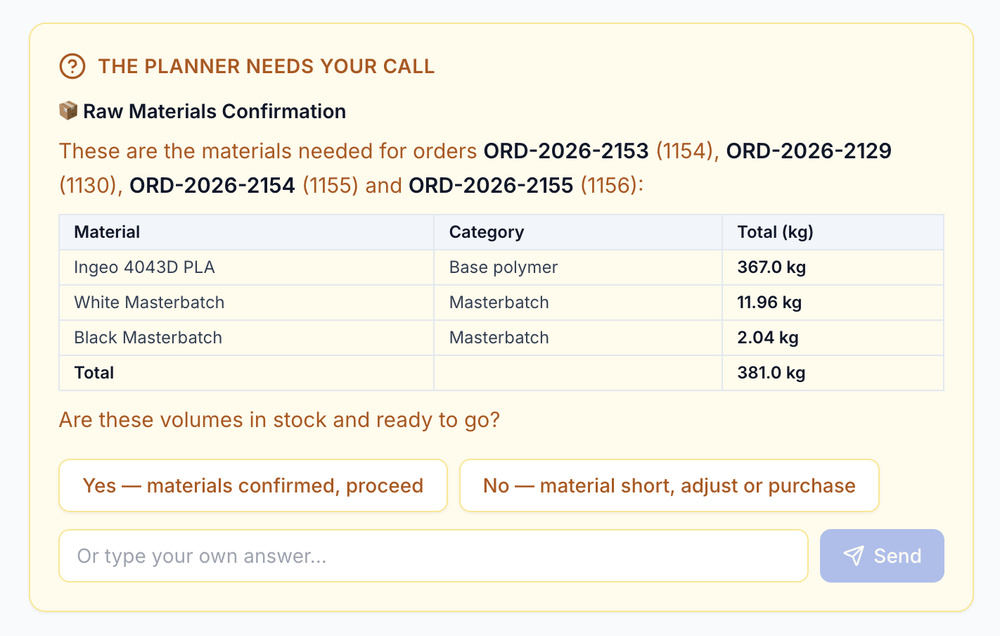
Manager call · materials 381.0 kg
The planner needs your call: raw-materials confirmation for four orders — 381.0 kg total — confirm or adjust before scheduling.
Primary user

Planner + manager

Built for production planning decisions before work reaches operators.

Input

Selected demand

Start from chosen orders, backlog groups, directives, and planning constraints.

Output

Accepted scenario

Create jobs only after manager review and scheduler validation.

The planning moment

The question is not "what should we make?" It is "what can we commit without creating tomorrow's firefight?"

Filament planning gets messy when urgent orders, ProductHub families, line configuration, shifts, reservations, prep time, and changeover logic meet the real calendar. The agent turns that messy decision space into reviewable scenarios instead of another spreadsheet negotiation.

Before Planning pressure

  • Demand is clear, but the sequence is argued across spreadsheets, inboxes, and line memory.
  • Prep time, shared machine reservations, and shifts are rediscovered after a plan is already promised.
  • Manual edits are hard to reuse as planning context, so the next plan starts cold again.

With the agent Scenario planning

  • Select demand, add directives, and ask for a plan grounded in the live acqSYS schedule.
  • Review scenarios with human-readable order numbers, product labels, line names, configurations, and split-order labels.
  • Edit assignments, revise the plan with new instructions, then commit the accepted scenario through scheduler validation.
What the agent does

Every plan stays reviewable and editable before a single job is created.

The planning session keeps the demand, directives, scenario discussion, editable plan, and preferences that shape the next planning round — so your team moves from selected demand to a reviewed, scheduler-checked production plan without starting cold.

01 — Select and direct

Start from real demand, then give the agent the operating intent.

The agent is launched from selected orders or backlog context. Managers can add directives such as protect an urgent delivery, batch a product family, reduce changeover, or keep a line clear for maintenance.
  • Selected orders. Sessions store the demand being planned, not a vague prompt.
  • Free-text directives. The planner can state business priorities in normal production language.
  • Reusable preferences. Learned planning memory can capture prep, warm-up, note style, language, and general preferences.
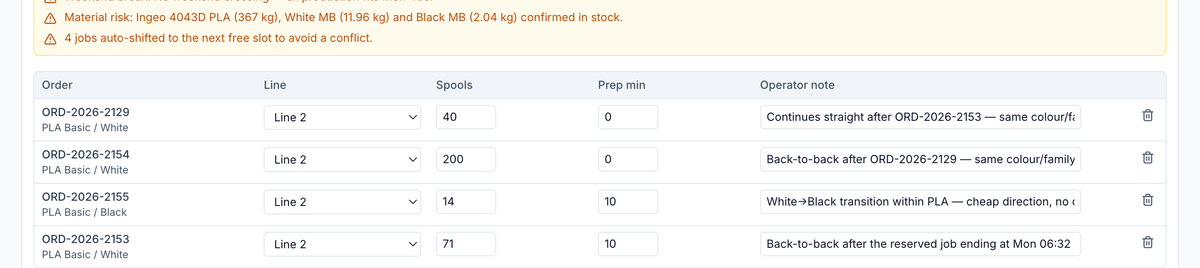
4 jobs · Line 2 · back-to-back
Proposed jobs from a planning round: four orders sequenced on Line 2 with spools, prep minutes, and operator notes.
02 — Compare and edit

Review scenarios before they become jobs.

The agent asks managers for the decisions that matter, generates plan scenarios, and returns them with the reasoning behind each tradeoff. Planners can hand-edit assignments such as line, configuration, spool count, prep time, notes, and intended start.
  • Scenario inspection. Compare schedule options side by side before anything is committed.
  • Planner Gantt. Edit the timeline instead of accepting a black-box answer.
  • Revision loop. Send manual edits plus new instructions back into another planning round.
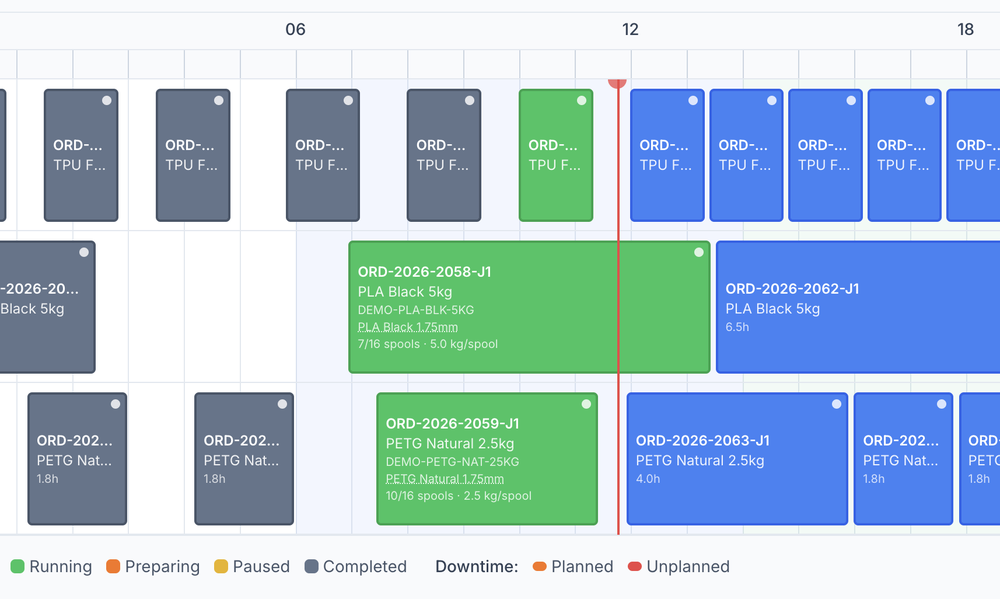
Capacity timeline: completed, running, and planned jobs scheduled across three production lines, with a live now-marker.
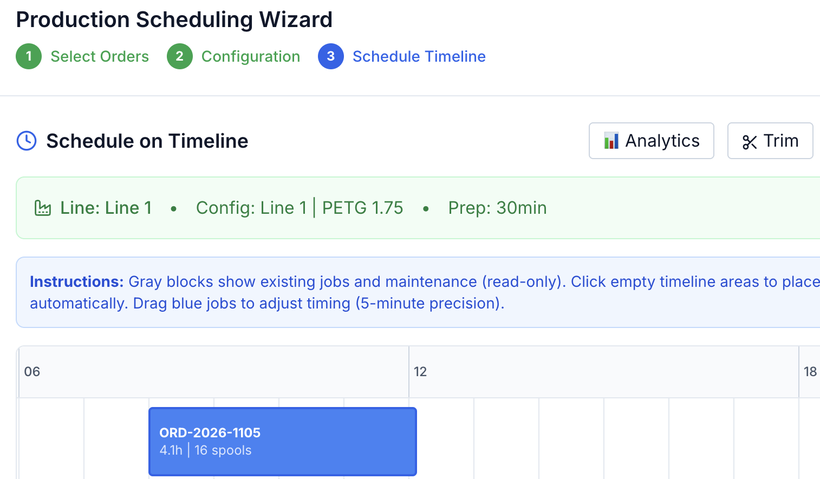
Line 1 | PETG 1.75 · prep 30 min
Production Scheduling Wizard: select orders, configure, then place a job onto the Line 1 timeline.
Planning guardrails

The agent proposes. acqSYS still validates the production commitment.

The point is not "AI makes a schedule." It is that AI-supported planning stays inside the same production-management rules that protect your capacity, shifts, reservations, conflicts, jobs, operators, QC, reports, and fulfillment.

Manager-reviewed scenarios

  • Plans remain reviewable before commit.
  • Managers can edit assignments instead of accepting blind automation.
  • Revisions turn human judgment into the next planning context.

Scheduler-validated commit

  • The agent never writes jobs directly.
  • Accepted scenarios commit through the existing validated batch scheduler.
  • Readable conflict lists come back when the scheduler rejects a plan.

Operational schedule awareness

  • Live schedule validation and free-slot placement.
  • Shift, reservation, prep-time, and gap-compaction context.
  • Order splitting and weighted optimization when the selected demand allows it.
Two AI features

One is for planning before production. One is for process review after evidence exists.

acqSYS has two distinct AI tools. One plans work before it exists; the other reviews process evidence after spools are measured. They stay separate so each answer stays accountable.

Operational AI Production Planning Agent

  • When: before jobs are created or revised.
  • Who: planners and managers.
  • Value: scenarios from selected demand, manager directives, editable assignments, revisions, and scheduler-validated commit.

Explore the planner

Beta AI Process Advisor

  • When: after spool and process evidence exists.
  • Who: technologists, QA, managers, and admins, not operators.
  • Value: process-advice decision support, outcome tracking, and roadmap toward closed-loop optimization.

Explore the advisor

Connected features

The agent plans inside the record the rest of acqSYS runs on.

See the AI Production Planning Agent in action

Bring the week your planners keep negotiating by hand.

We will plan a realistic week from your order mix, ProductHub families, line configurations, prep rules, and delivery pressure — and let your managers judge the scenarios.