Features / Connect & sustain

01 Integrations & automation

Automation with guardrails — every import previewed, mapped, and logged.

acqSYS runs each integration as a guarded loop: connect a platform, preview what it wants to create, map SKUs and fields, then sync on rules with a full audit trail on every record it creates.

Use the demo to preview how an external order becomes production-ready work in acqSYS.
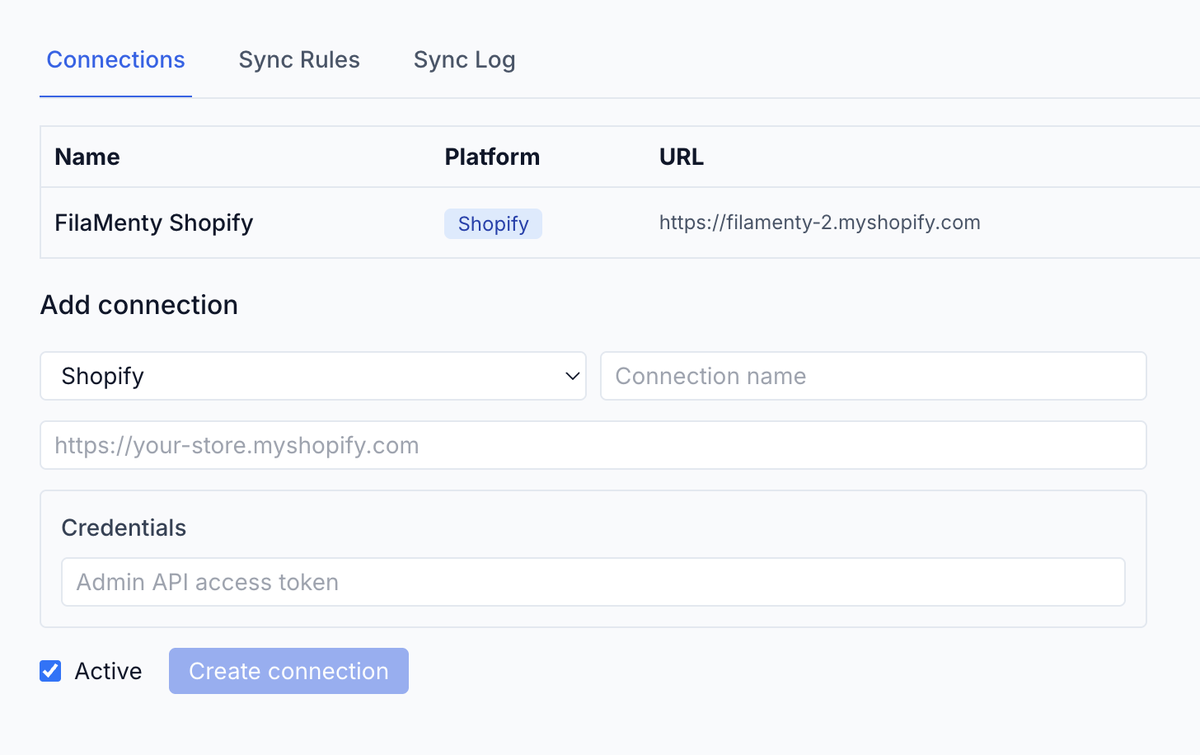
Integration connections: FilaMenty Shopify connected with its store URL, and the add-connection form with credentials.
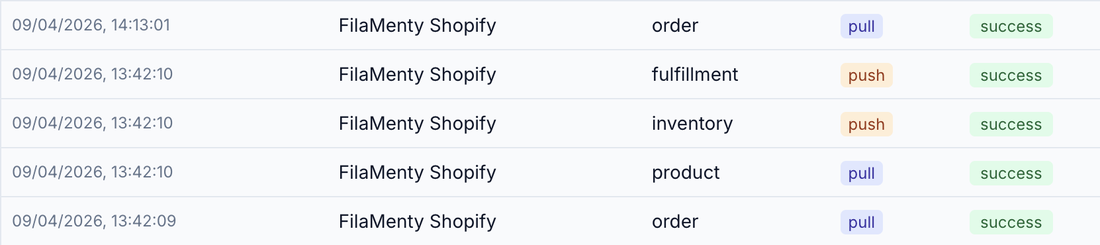
5 syncs · all success
Sync log: order pull, fulfillment push, inventory push, and product pull for FilaMenty Shopify — all success.
Primary user

Admin + operations

The team deciding which external data is safe to automate.

Integration style

Adapter-driven

Each adapter handles auth, API calls, normalization, rules, logs, and mapping.

Best demo

Shopify pull preview

Preview external orders, map SKUs, and confirm production orders.

The moment

Automation should not let bad order data walk onto the line.

A store, ERP, or industrial source can move quickly, but production and engineering still need ProductHub readiness, SKU mapping, capacity, process context, QC, labels, and fulfillment discipline. The integration should feed that workflow, not skip it.

In acqSYS

What changes in acqSYS

  • External platforms connect through integration connections, sync rules, entity maps, and sync logs.
  • Imports can be previewed and confirmed before they create production orders.
  • Stock and fulfillment syncs can be tied to confirmed production and configured rules rather than manual copy-paste.
What you get

Store orders, ERP data, and line signals arrive mapped, previewed, and logged.

Connect a store or an ERP once and every order arrives with SKU mapping, an import preview, and a sync log; line signals land as mapped telemetry with the same audit discipline.

01 — Commerce

Commerce

Shopify, Odoo, and spreadsheet import, plus custom connectors where scoped.

02 — Industrial data

Industrial data

Supported protocols: OPC UA, Modbus TCP, MQTT, Beckhoff ADS, and EtherCAT.

03 — Audit trail

Audit trail

Connection, rule, entity-map, sync-log, preview, confirm, retry, and webhook context.

Workflow

The integration handshake

Automation is safe when each order, stock, telemetry, or process handoff has mapping, validation, and an audit trail.

  • Connect. Create a platform connection with scoped auth, base URL, version, credentials, and sync direction.
  • Preview. Pull external orders or data into a review step before creating production records.
  • Map. Resolve SKU, ProductHub, location, field mapping, and external IDs.
  • Sync. Run manual, scheduled, or webhook-triggered syncs with logs, retries, and fulfillment updates.
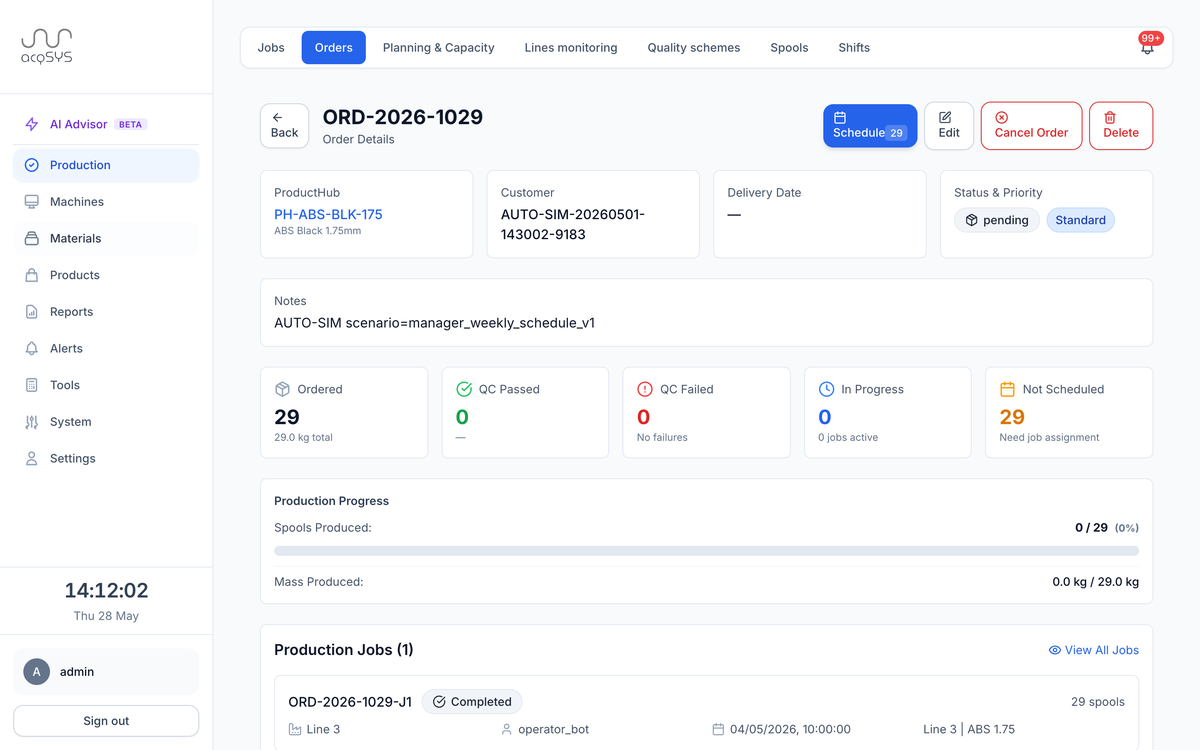
Order details for an imported order: ProductHub mapping, customer, status, and fulfillment progress.
Imported · 29 awaiting scheduling
Fulfillment tiles for the imported order: 29 ordered, 0 QC passed, 0 in progress, 29 not scheduled — awaiting job assignment.

An imported order arrives ready for review. Its 29 spools wait for scheduling — nothing bypasses planning, and external systems receive confirmed production outcomes, not assumptions.

Commerce & ERP flow

  • Store and ERP orders arrive as previews, mapped to SKU and ProductHub before they become production orders.
  • Stock and fulfillment updates flow back only after production is confirmed.
  • Connector status, tiers, and scope live on the integrations overview.

Machine-signal flow

  • Variable mappings decide which line signals become production evidence.
  • Approved signals feed monitoring, QC, reports, R&D evidence, and AI Process Advisor (beta) review — missing mappings are surfaced, not hidden.
  • The supported protocol list lives on the integrations overview.

Automation value

  • Less manual order entry.
  • Cleaner SKU/ProductHub validation.
  • Better stock or fulfillment updates after production is confirmed.
Honest scope

Every connector has a real implementation scope.

Authentication, field mapping, rate limits, webhook rules, location mapping, industrial access, and customer-specific business logic must be confirmed before promising a live integration.

acqSYS advantage

Every import lands on the records your plant already runs on.

Integrations feed the same production order, job, spool, process, QC, label, report, fulfillment, and alert records used by the plant.

Connected features

Everything feeds the same production record.

See Integrations & automation in action

Map the integration that removes the most manual work or closes your biggest engineering blind spot.

We will review your order sources, SKU mapping, industrial-protocol access, stock sync, and webhook requirements.