Features / Run the line & cut scrap

04 Machines & formulation

One recipe can serve every brand and package — without breaking QC or labels.

acqSYS uses ProductHub to separate the manufacturing formulation from commercial SKU identity, then connects recipes, machine configurations, process settings, QC schemes, and labels to production jobs.

Use the demo to see how one ProductHub feeds planning, operators, QC, and labels.
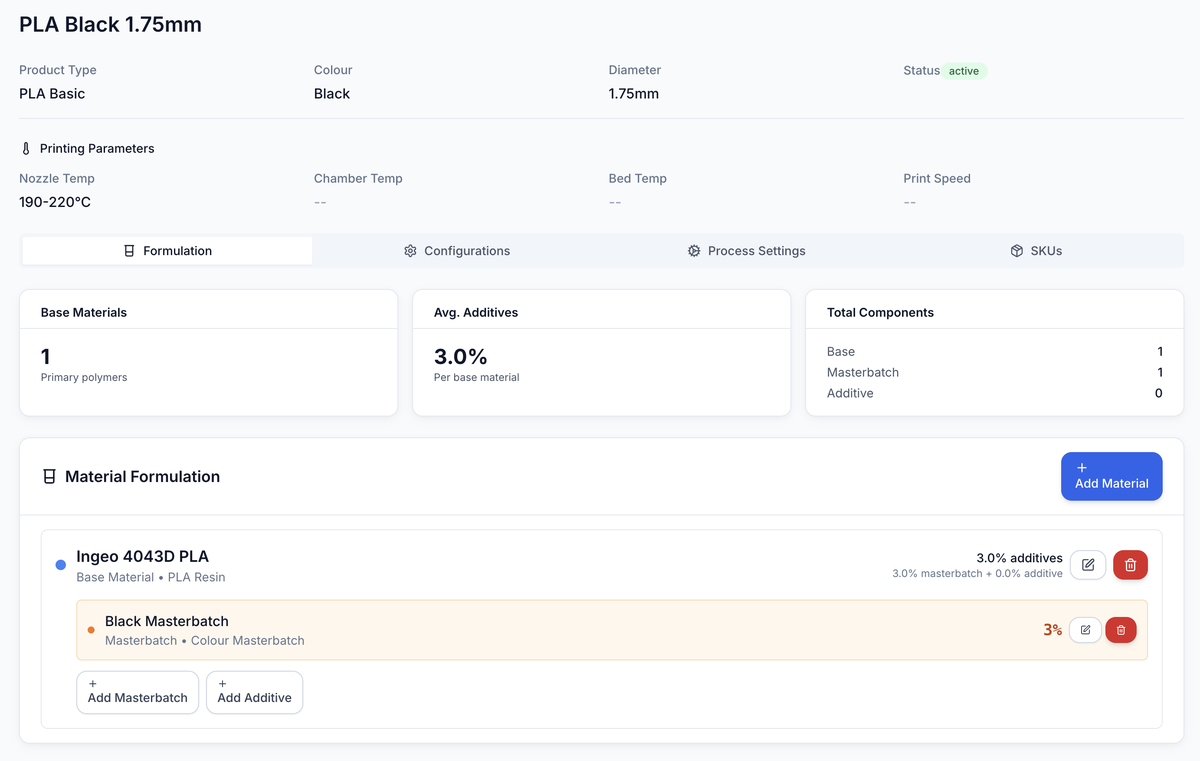
ProductHub for PLA Black 1.75 mm: printing parameters, formulation stats, and the material formulation — Ingeo 4043D PLA base with 3% black masterbatch.
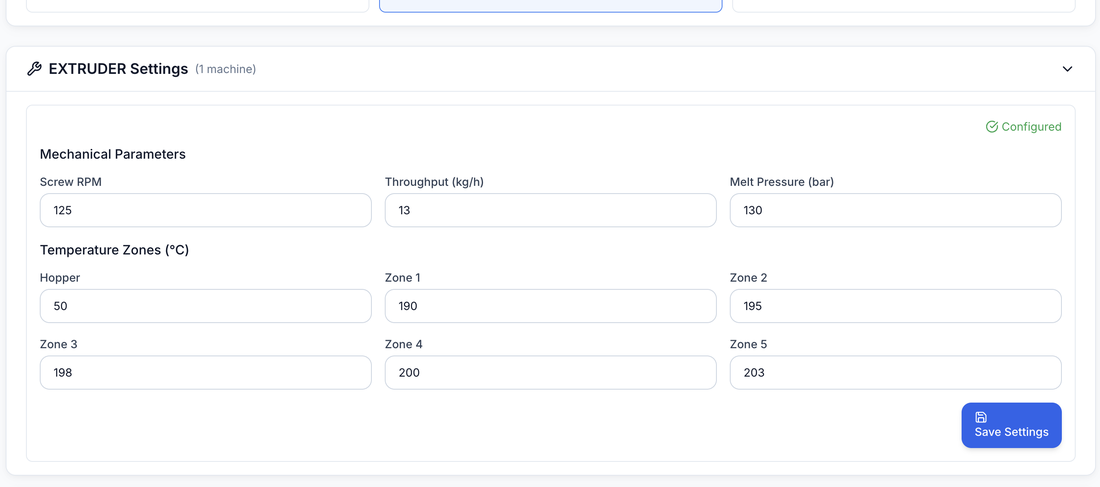
Screw 125 rpm · 13 kg/h · 130 bar
ProductHub process settings for the preferred Line 2 configuration: screw 125 rpm, throughput 13 kg/h, melt pressure 130 bar, and temperature zones 190–203 °C.
Primary user

Technologist

The person keeping product setup trustworthy across production, packaging, optimization, and R&D.

Key model

One ProductHub → many SKUs

One manufacturing recipe serves multiple brands, packages, and commercial variants.

See it in the demo

New product setup

Create or review a formulation and see where it appears downstream.

What you get

Recipe, commercial identity, and machine fit stay one model.

ProductHub holds the versioned formulation, the SKU layer holds the commercial variant, and configurations tie both to the machines that can run them.

01 — The recipe

ProductHub

Versioned formulation, recipe, material percentages, diameter, process settings, and QC scheme.

02 — The package

SKU layer

Commercial variant, brand, package mass, EAN, reel, lifecycle, label, and market context.

03 — The equipment

Machine fit

Configurations connect product definitions to the lines and machines that can run them.

The moment

Product data gets risky when recipe and commercial SKU are treated as the same thing.

A filament formulation may be sold under multiple package sizes, brands, or markets, and may also evolve through trials. If manufacturing settings, QC rules, labels, process notes, and commercial identity are flattened together, every change risks breaking another workflow or hiding what actually improved.
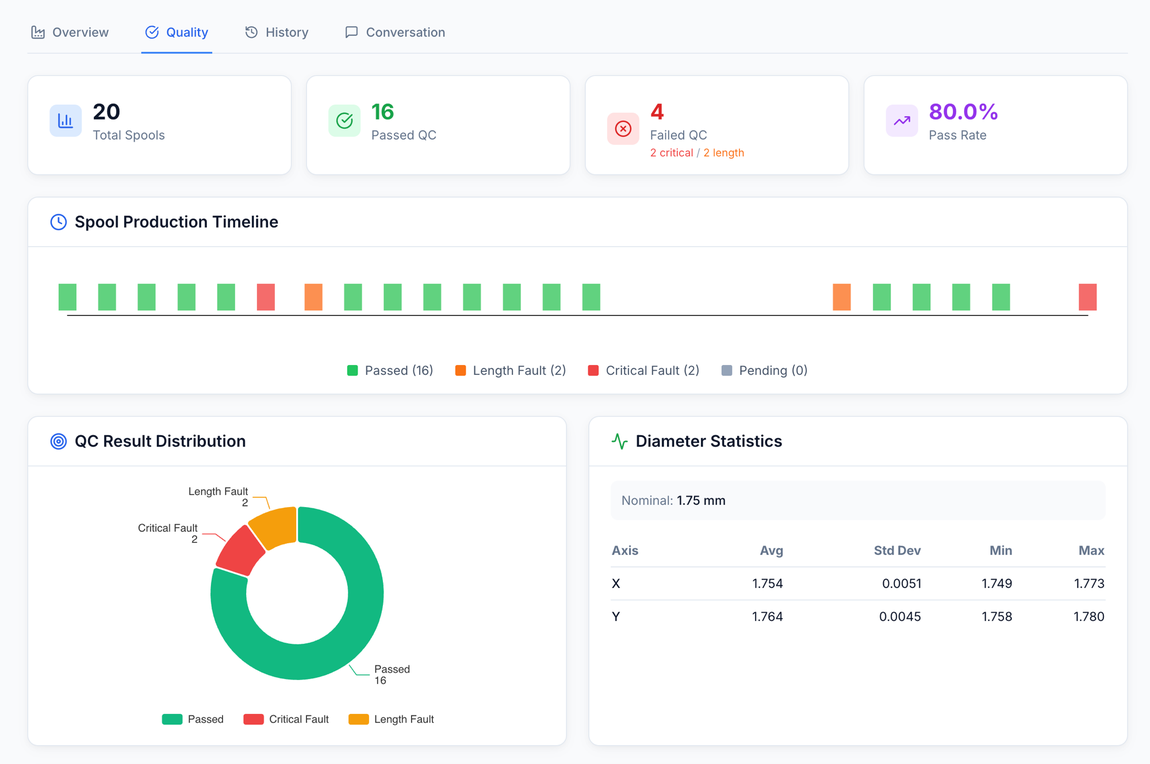
80% pass · 16 of 20 spools
Spool quality dashboard: 20 spools, 16 passed (80% pass rate), production timeline and QC result distribution.

One product definition drives what operators see, what QC checks, and what labels print. Planning, QC, labels, and process review stop inheriting stale commercial fields.

With acqSYS What changes

  • ProductHub stores the manufacturing formulation, machine setup, process settings, diameter, QC scheme, trial context, and version lineage.
  • SKU stores brand, package mass, EAN, reel, lifecycle, pricing, label overrides, and market identity.
  • Production orders and jobs carry ProductHub and optional SKU context into planning, operators, QC, labels, and reports.
The machines

Lines, machines, and the settings that run them.

The formulation is half the model — the other half is the equipment it runs on, kept specific enough that process settings mean something per machine.

Equipment

Lines & machine types

Production lines are modeled machine by machine — each unit in the line's sequence is a typed piece of equipment.

Compatibility

Line configurations

Line configuration management records which lines and machine setups can run a given product, so work is planned only onto lines that can run it.

Targets

Per-machine process settings

Process settings attach to the machine that owns them — screw speed, throughput, melt pressure, and temperature zones per configuration.

01 — Workflow

Define a formulation once; QC, labels, and reports stay in sync with it.

The model supports the way filament producers separate what they make, how they sell it, and how they learn from it.
  • Define formulation — Create ProductHub recipe, material mix, diameter, process targets, trial context, and compatible configurations.
  • Attach QC — Link the QC scheme and gauge expectations that will evaluate produced spools.
  • Create SKU — Add commercial packaging, brand, EAN, reel, market, and label context.
  • Run production — Use the same product model in orders, jobs, operators, labels, reports, and verification.
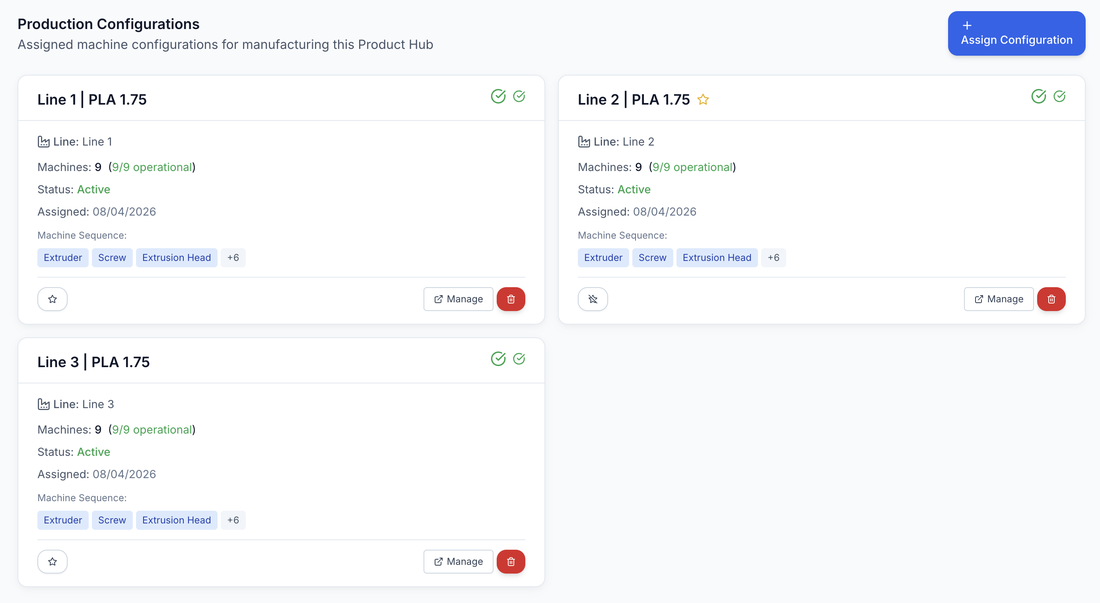
3 lines · 9/9 machines
Production configurations: Line 1, Line 2, and Line 3 assigned to PLA 1.75, each with 9 of 9 machines operational and an extruder-screw-head machine sequence.
Manufacturing truth

Manufacturing truth

  • Recipe rows for base material, masterbatch, additives, sequence, and percentages.
  • Machine-specific process settings and compatible configurations.
  • Versioning and parent ProductHub lineage.
Commercial truth

Commercial truth

  • Brand, market name, package mass, EAN, reel, and lifecycle status.
  • Label and public-verification overrides where configured.
  • Shop, TDS, and SDS links at the ProductHub or SKU layer.
Why it matters

Why it matters

  • Planning batches by manufacturing formulation.
  • Correct QC and labels for every produced SKU.
  • Cleaner reports and R&D reviews by product, SKU, and ProductHub.

Honest scope The model needs ownership.

ProductHub and SKU data should have clear owners. If recipe, process, QC, trial, or label changes are made casually, downstream production workflows and engineering reviews inherit that uncertainty.

acqSYS advantage The product model is built for filament, down to the spool record.

The ProductHub/SKU/spool architecture is built around filament manufacturing and process learning, not a generic item master adapted after the fact.

Connected features

One product model feeds every downstream workflow.

The product model is the source the rest of acqSYS reads from — documentation, planning, and labels all resolve against it.

See Machines & formulation in action

Untangle recipe, SKU, machine setup, and label logic.

Show us your product range and we will model it as ProductHub formulations, machine configurations, SKU variants, and label rules.